Creating a Date Picker Input Using HTML5
Welcome back to Kuasai Teknologi! This tutorial will focus on Date Pickers, which are used to easily capture date and time information from users.
Date Input Types
HTML5 offers several specific input types for date and time:
- Date: Select day, month, and year.
- Month: Select month and year.
- Week: Select week and year.
- Time: Select hours and minutes.
- Datetime-local: Select date, month, year, and local time.
Example Code
The basic syntax for a date input is:
date: <input type="date" name="tanggal" />Here is a more comprehensive example showing various HTML5 input types:
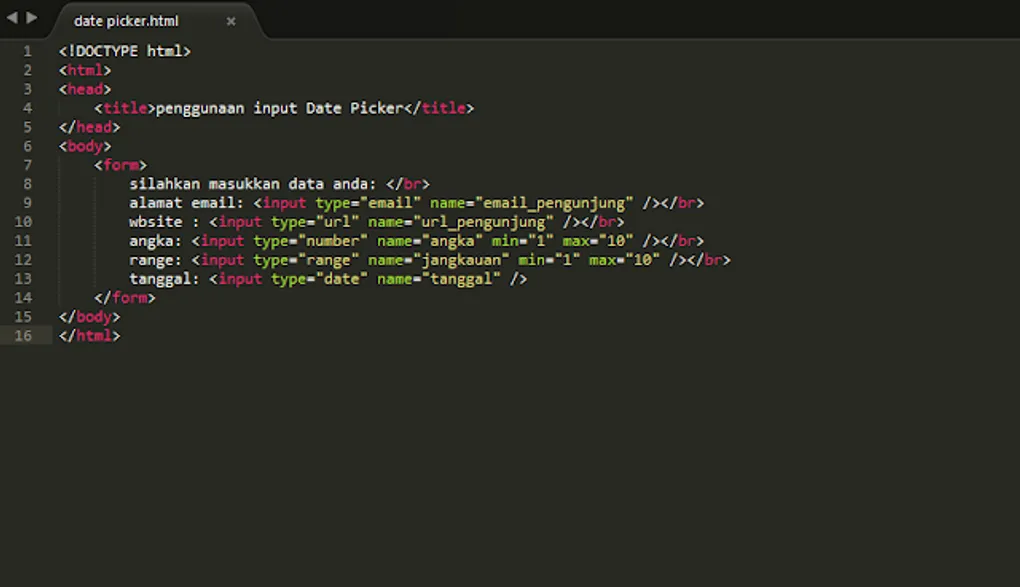
<html>
<head>
  <title>Using Date Picker Inputs</title>
</head>
<body>
  <form>
    Please enter your details: <br/>
    Email: <input type="email" name="email_pengunjung" /><br/>
    Website: <input type="url" name="url_pengunjung" /><br/>
    Number: <input type="number" name="angka" min="1" max="10" /><br/>
    Range: <input type="range" name="jangkauan" min="1" max="10" /><br/>
    Date: <input type="date" name="tanggal" />
  </form>
</body>
</html>
Browser Appearance
When viewed in a modern browser (like Opera), each field will display specialized controls based on its type.
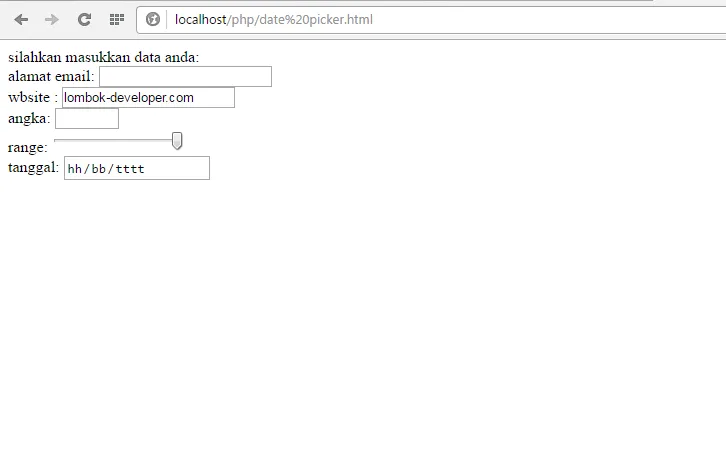 Result of the script above
For a more detailed explanation, you can watch the video tutorial below:
Thank you for following along! I hope this is useful. Don’t forget to subscribe for more content. See you next time!
Don’t forget to practice immediately!